Cherry Ai: A Sweet Font for Campaign Creativity
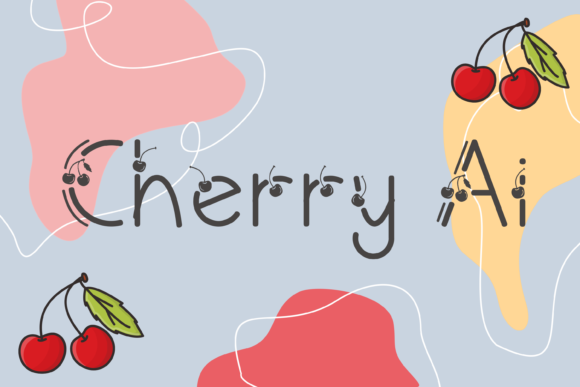
I was designing a product launch graphic for a seasonal sale when I stumbled upon Cherry Ai. The moment I saw it, I knew it had the right vibe. It's a decorative font with a charming personality—think of delicate cherry ornaments woven into each letter. This isn't just any typeface; it's a visual storytelling tool that adds warmth and whimsy to any design.
Cherry Ai has a soft, handcrafted feel that makes it perfect for creative campaigns that want to stand out without being too bold. Its curves and ornamentation give off an authentic, artisanal mood, which is great for brands looking to communicate a sense of care and attention to detail. Whether you're working on a promotional poster, social media post, or email header, this font brings a unique flair that can elevate your visuals.
Using Cherry Ai in Real Campaigns
I tested Cherry Ai in several campaign scenarios. First, I used it for a YouTube thumbnail set. The font’s ornate style worked well as a title for a video about handmade crafts. It added a touch of elegance and made the thumbnail more eye-catching in a fast-scrolling feed.
Next, I applied it to an Instagram post promoting a limited-time offer. The font’s playful nature complemented the theme of the post, which featured festive decorations and seasonal items. It helped create a cohesive look across all elements of the post, from the headline to the call-to-action button.
I also experimented with using Cherry Ai in a Pinterest campaign focused on DIY projects. The font’s delicate design matched the aesthetic of the pins, making the text feel like part of the overall visual narrative. It didn’t overpower the images but instead enhanced them by adding a personal, handmade touch.
Design Considerations and Readability
While Cherry Ai is visually appealing, it's important to consider its readability. Because of its intricate details, it works best for short headlines, callouts, and decorative titles rather than long blocks of text. In mobile previews and small thumbnails, the fine lines might get lost, so I recommend using it sparingly and ensuring there's enough contrast against the background.
For digital ads and website banners, I paired Cherry Ai with a clean sans serif font for body text. This combination provided a nice balance between creativity and clarity. The ornate display font caught attention, while the simpler sans serif ensured that the message remained easy to read.
When using Cherry Ai on dark backgrounds, I noticed that it still maintained its charm but required a bit more spacing between letters to avoid visual clutter. On light backgrounds, it looked even more elegant, almost like a hand-painted sign.
Font Pairing and Practical Tips
One of the most effective ways to use Cherry Ai is to pair it with a complementary font. For example, if you're creating a branded template pack, try combining Cherry Ai with a modern sans serif like Montserrat or a classic serif like Playfair Display. This creates a strong visual hierarchy and ensures that your message is both engaging and legible.
Before using Cherry Ai in client campaigns or digital products, check the included styles, alternates, ligatures, weights, and file formats. Make sure the font supports the languages you need and that you have the proper commercial license for your intended use. These details can make a big difference in how well the font performs across different platforms and mediums.
Cherry Ai is a freebie font that offers a lot of creative potential. It’s ideal for designers who want to add a touch of personality to their work without sacrificing professionalism. Just remember to use it strategically—where it enhances the message rather than distracts from it.
Whether you're launching a new product, running a seasonal promotion, or building a content series, Cherry Ai can be a valuable asset in your design toolkit. It’s not just a font; it’s a way to connect with your audience on a more emotional level through thoughtful typography choices.